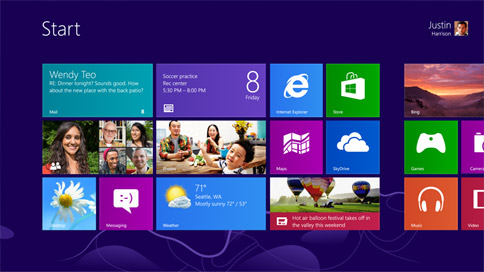
Upgrading to Windows 8 has been made very easy and surprisingly cheap. If you have Windows 7 currently installed on your machine and at least semi-decent specs, then you can upgrade to Windows 8 for $40 in no time at all.
But the question is, do you want to? With so many changes in Windows 8 this is a big decision and it’s not quite so straight forward as it was when you chose to embrace Windows 7. This has been designed as a touch and mouse based OS meaning that some of the things you’re familiar with just no longer exist and meaning that you’ll have to learn some new tricks and adapt to a new way of doing things. There’s no Start button for instance, and the Desktop is no longer the centre of everything you do.
Despite these changes however I’m going to argue that Windows 8 is a worthwhile upgrade and that you should on this occasion opt to embrace change – particularly if you run a blog or website or otherwise work online. Here’s why…
It’s Faster
The boot time for Windows 8 has been said to be about twice as fast as the boot time for Windows 7. This means that you do get a ‘close to tablet’ experience when it comes to quickly loading up and getting started which means that you don’t have to sit waiting as long for your computer to load up so that you can get typing. Five minutes saved a day even is worth investing in, but you’ll save more than that because the software all loads quicker too.
It’s Great for Touch Machines
While most of us still do most of our work with a keyboard and mouse, if you do have some kind of hybrid device then there’s no question here – you should install Windows 8 because you’ll get a lot more from that touch screen (and the swiping from the edges is very quick to operate with the thumbs).
It’s the Lesser Evil
Windows 8 represents change, but if you stick with Windows 7 you’re going to be left behind. Let’s think about what your other options are here – OSx? Linux? While you might like those two options, either of them are going to represent a bigger change still than switching to Windows 8 because they won’t run your ‘legacy software’ (in other words software for Windows 7). If you want to run the software you’ve loved and paid for, but you don’t want to be stuck in the past, then Windows 8 is your only realistic option (other than maybe Linux running Wine…).
The App Store
Having an app store on a PC is an interesting idea and could be a great way to get cheap games delivered to your machine and handy little apps made by developers. Meanwhile if you’re interested in app development then potentially this is going to represent a very real money making opportunity with a HUGE market and limited competition so it’s worth getting involved.
It Looks Nice
Whatever else you say about Windows 8 it does look cool. Sometimes just changing things up is interesting and exciting anyway, but when it looks this good it’s definitely worth taking the plunge just for a bit of something new. And you can always change back…
It’s a Big Topic
If you run a tech blog then you need to have Windows 8 on at least one device so that you can write about it. Even if your blog is in a different niche though, this is still going to put you at the forefront and mean you can join in with all those Windows 8 competitions rather than standing outside in the cold…
The guest post is written by George Ben who has been working on SEO and internet marketing since decades. Through his blogs, he recommends useful SEO tips and tricks to get your website on the first page google ranking.
Imagine…
…a wheelbarrow in an open field that you drag along every day filling it with this and that – each thing you add to it has some significance and some use.
Now imagine you never empty the wheelbarrow. Each day, not only do the things you found the week before now lie at the bottom covered by the newest additions, but the device also becomes increasingly heavy to pull until eventually, it becomes almost impossible.
Now think of the wheelbarrow as your website, and think of its contents as the factors affecting its speed – Let’s explore these factors…
Bad HTML:
- Empty spaces between code (This only adds to processing time)
- Missing tags (Causing internal errors & bugs in the site)
- Bulky HTML (such as using unnecessary tags where something more CSS compatible would work better e.g. using the tag “font-size” rather than just “small”)
- Background colour being the same as text colour (making all text unreadable)
- Hyperlinks that fail (Devaluing your site in terms of credibility, and possibly increasing bounce rates)
- Missing images
An overload of HTTP requests:
Whenever your web browser fetches a file from a web server, for example when it loads a picture, it does this by using HTTP which stands for “HyperText Transfer Protocol”.
HTTP is an action whereby you’re computer requests for a particular file. One example is a request for ‘home.html‘ (the homepage of a particular website). The web server then sends a response to the computer that says something like: “Here’s the file you asked for” which is followed by the actual file itself.
Understandably, if your server is receiving a very high volume of requests for a range of different things, such as pictures, graphics, photographs, music players and video rendering, it can take its toll and end up really slowing your website down.
JavaScript/Flash overuse:
JavaScript helps make things look nice. Lines of code enable things such as widgets, adverts, and analytics services to work successfully. The issue is that both kinds of software can be “heavyweight”. JavaScript performs ‘sequentially’ rather than ‘concurrently’ – this means that nothing else loads before JavaScript loads. Of course, this becomes an issue when you have tonnes of JavaScript code, each one longer than the last, preventing anything else from happening.
Too many cookies:
HTTP Cookies are used mainly for personalization and authentication purposes. A series of saved information is exchanged between the web server and the browser in order to remember things about how you are using the internet. For example if you are shopping online and exit the website returning at a later date, a cookie will enable the site to remember what you had in your shopping cart so you don’t have to spend time finding the same items again.
However, because saved information is being kept on the server, a build up of this can add to the process time on a website. In some cases, hackers even use cookies as an opportunity to track browsing activity; this is called spyware…so beware!
Bad hosting:
Web hosting is the business of providing storage space and access for websites. Bad web hosting happens when said storage space is overloaded with many websites, yours is added to the list and so runs slow. Other issues caused by a bad web host include:
- Search engines being unable to crawl your site resulting in a fall in Search Rank
- Your website being “down” (not working, sending out 404-errors)
- Not being able to contact your web host to fix the issue (since the service is so bad the system has probably crashed)
Excess of external media:
Embedded YouTube videos, actually embedded anything that is coming from another website can potentially slow yours down. When you embed something from another site, you are relying on that sites web server, that sites speed, and that sites ability to ensure the embedded item is working properly there, so that it works properly on yours site. Often, even when it works just fine, it might add an extra few seconds to a certain page loading…a few seconds a potential customer may be unwilling to wait!
Spam:
Spam is so much more than just a bunch of annoying emails. It slows down the Internet and it increases consumer fees.
The internet is a network where spamming effects everyone that uses it. To push spam around the internet relies on a process; it begins with global networks that pass the spam along to their destination, and ends with the message being received by the recipient.
Simultaneously, time, money and resources are used trying to catch and prevent spammers from infiltrating mail servers resulting in higher costs to the consumer because providers are forced to add more security to their servers and hire more staff to manage and prevent the problem.
Be sure to spam proof all web forms by adding “captchas” or similar.
Favicon neglect:
A ‘favicon’ is an image (as shown above) that stays in the root of your server. It’s definitely needed because even if you don’t care about them, the browser still requests one. If there isn’t one, it will respond with a 404 error (meaning not found). Any error message, such as a 404 or 301, is an extra message sent that adds time to the processing of a site.
This image or lack thereof, interferes with the processing sequence by requesting extra components in the load, and since the favicon is the first thing that is downloaded before these extra components, if there isn’t one, the first thing downloaded will be an error.
Too many advertisements:
Any time a site uses advertisements, you are adding to other processes a site goes through in order to function correctly. Programmes like Google Adsense and Microsoft adcenter are external, and reputable, however it is logical to practice the same rules as with external media; everything in moderation – besides, sites with too many ads look un”site”ly!
If any of these apply to you, take active steps to protect your website against sloth! Speed be with you!
Did you mean…/search instead for…?
YES, of course I meant that! – And If I left a vowel or a connective out because unlike you I am not a robot & I like to use computer-speak, then so be it. The bottom line is you knew what I meant – so did you have to be as condescending as that and point out the mistake I made?
Google Instant
Really Google? Finishing the search before I have written it? I mean c’mon – it’s one thing that you’re arrogant enough that you feel you need to tell me the speed in which you gathered my results, now you’re finishing my sentences for me like we’re in a marriage?
Personalised results
I’m at work, I’m signed into Google. I search a keyword phrase I’m using in Google Adwords & bingo – I’m ranking number 3 on the 1st page! That’s weird, yesterday I was on the 5th page, I haven’t upped the bids in-fact – I haven’t made any changes, but I’m not complaining at all, instead I sit & wait for the money to roll in. I get home from work and quickly carry out a query and sit back waiting to see my site turn up on the first page for that particular keyword and… hold on, it’s not there? I click to the next page and nothing. I carry on until get to page 5 and there my ad is. I find and ask an SEO expert why this has happened & I’m told that when I’m signed into Google, the results differ from when I am signed out. I feel as though I’ve been living in the Matrix. *sigh*
Google seasonal/holiday/anniversary/event themes
I know its Christmas when the streets are paved with sleet and debris and every shop I go into leaves me that little less well off than I was before I walked in. I know its May-Day when I get that extra day off of work, I know its election day when people lie to me about which policy I ought to be interested in because the amount of tax I pay will go down. Nevertheless, Google wants in on the reminders too. I guess its okay, but sometimes I just don’t want to care. I’m sorry.
Google Chrome’s Sloth
Look. I want a *extremely mild expletive* homepage button on the interface without having to go into the settings and put one there! Is that too much to ask? – Surely not if Firefox and IE understood it.
Sorry, we own YouTube so you can’t sign in without us knowing
Now, they may say a change is as good as a rest but I beg to differ. I’ve been signing in with the same username & password since I opened a YouTube account but Google wants more of a direct approach. Now you cannot access your settings unless you sign in via your Gmail account, which is reasonable enough – but what if you have multiple Gmail accounts? I don’t really have a problem with this one, but imagine if Google started buying up everything on the internet enforcing this same sign in rule or else no access. While it may not be that bad, it’s the principle…
…Oh well, as Google grows stronger by the query, I’m sure there will be more to add to this list soon!
The current trend of Newspaper sites to publish their content behind paywalls seems to be gathering speed. The recent Google announcement of its OnePass payment system can only increase the process by making payment technology available to a wider audience.
I thought it would be interesting to look to see how the move to paywalls has affected the news sites backlink acquisition rates.
So far the main newspapers that have added Paywalls have been,
- The Financial Times – 2002
- Moneyweek – 2005
- The Times and The Sunday Times – April 2010
- The News Of The World – November 2010
- The Telegraph is set to add a paywall in September 2011
Taking the two most recent examples of The Time and The News Of The World, and using the excellent Majestic SEO graph functionality we are able to see changes on their backlink acquisition rates.
We can see clearly from the graph above that following the addition of the paywall in November 2010 over the next two months inbound links to The News Of The World fell by more than 50%

Similar, but less dramatic results for The Times. This is slightly more confusing as the paywall coincided with a domain change from timesonline.co.uk to thetimes.co.uk. We can see clearly that link gains to the old URL start to decline without the new domain ever really gaining links as a comparative rate.
Where I see some really interesting data is in the rate of acquisition for competitors sites who chose not to implement a paywall. A close online and offline competitor to both The Times and NOTW is The Daily Mail.
Their acquisition rate starts to climb sharply from the date The Times paywall goes live, and their highest ever month coincides with the NOTW adding their paywall. It’ll be interesting to see if the following two low months, December and January are a result of incomplete link data or some other trend.
It’s an interesting theory to see of the final few content producers within a market start to perform far better in terms of finance and popularity than those that eventually choose to follow the paywall route.
This article is aimed at people new to e-commerce. It covers some of the basics of ensuring that your website maximises conversion rates.
It should also be read alongside 12 quick ways to increase conversion rates.
For more experienced e-commerce managers please see this article on advanced techniques for increasing conversion rates.
1) Minimized Navigation on Shopping Cart/Basket Pages
There is nothing more frustrating for an online retailer than an abandoned basket. Why did the user go all that way and then lose interest??
It’s fair to assume at the check out stage that a user does want to buy something. So our advice is to minimise the navigation available on your shopping cart pages. Keep wording short, simple, and to the point. Do not allow any distractions that could potentially pull your customer away or cause a delay.
By adding in lots of last minute deals and offers you risk diverting attention and losing the sale. Not everyone subscribes to this method, however at Datadial we believe it to be the best option.
An example: http://www.yapp.co.uk/pages/checkout_Login.aspx

2) Clear and Upfront Notification of Delivery Charges
Tacking on fees on to a final price without notification early in the buying process is the quickest way to lose a potential sale. Numerous surveys have revealed that hidden delivery costs are the number one reason for people to abandon a shopping cart. Notify your customers upfront if they will be required to pay any shipping or handling fees. This is a great way to increase conversion rates and build customer loyalty.
3) Clearly Display Trust Elements for Consumer Confidence
Remember, quite often users do not know who you are, where you are or really anything about you. Therefore it’s crucial you do everything you can to gain, nurture and keep your customer confidence in order to increase conversion rates. Here are a few ways to do this:
Clearly display “trust elements” on your website. Trust elements can include:
a. Credit card logos. Use only approved, high-quality logos representing the types of credit cards you accept. This helps customers feel more secure in knowing you are a legitimate business. It also shows the user that they can buy from your site. It may not be obvious otherwise.
b. Contact information. Whenever possible clearly display your companies contact information. Customers need to know they will be able to contact you if they have a problem, questions, or need more product details.
c. Real employee names and a company director. When people shop online they like to know with whom they are dealing. Displaying real names and titles of key company employees will help consumers feel more secure in knowing there are real people running the show and not just computerised robots or answering machines.
d. Photos of faces and places. Include photographs of the people with whom your customer is dealing. If appropriate and applicable, include very short biographies about the smiling faces on your website. Consider using photographs of your business location if applicable. This helps people understand yours is a legitimate business with a real location and that you aren’t likely to disappear in the night.
e. Visual verifications of claimed approvals, affiliations, and other credentials. If you have the “Good Housekeeping Seal of Approval” for example, proudly display it in a prominent place. If you have earned awards for business-related, and sometimes personal accomplishments, tell your consumers with a quality image and link that leads to more information.
f. Push any special customer services you have to offer. If your customer service representatives are bi-lingual or speak multiple languages, find a way to let potential consumers know from the get go.
Multiple Payment options
Most of the time one payment option on your site is totally adequate. But in the interests of maximising conversions you might consider adding other payment vehicles to your site.
The most popular alternative is PayPal. Some users only ever use paypal as they are comfortable with it and trust it. PayPal offers your customers options. They can pay with major credit cards, or can pay directly from their own PayPal account. It also has the advantage (depending on how you look at it) that Paypal store your credit card so that you do not have to re-enter it each time you visit a site offering Paypal. Paypal is also great one for small and start-up businesses that have no established a financial history with their banks. It’s fast and easy to register, display on your website, and capture funds that can be transferred right to your bank account.
So why not add it as an option?
Well it’s expensive with commission rates around the 3% mark (and 20p per transaction). Paypal also have a knack of siding with the buyer in the event of dispute meaning that refunds are issued on request, leaving merchants frequently out of pocket.
It’s an extra administrative thing to manage but if adding Paypal helps get an extra % sales conversion on your site then maybe it is worth it.
Google Checkout also offers easy solutions for start up merchants and small businesses. Google checkout claim to increase leads and create more conversions with a fast, easy, convenient checkout process.
You can also sign for basket abandonment alerts so you can recapture customers who wander away without buying!
The main advantage that Google Checkout has over Paypal is that its icon appears in Adwords results – so naturally drawing your eye to merchants using it, resulting in a 10% uplift in conversion rates according to Google.

However, Google Checkout has many drawbacks. Its interface and design are distinctly amateurish and this influencers trust building for users on their site. (Having said that Paypal’s interface is not much better). Also it’s only possible to link Google Check out to credit card accounts and not bank accounts.
Since its launch Google checkout has not taken off in anyway like Paypal before it and struggles for market penetration.
But, as above, if it means a small increase in sales conversions, and you can put up with the extra administrative hassle, then maybe it’s worth having Google Checkout as well as Paypal as well as normal Credit Card payment facilities.
Like Paypal, Google Checkout is suitable for small and larger merchants alike, though brand aware and high end merchants are unlikely to be found using either as there is undoubtedly something “cheap” looking about both!
Web usability is about designing your web site so that users can achieve their desired goal quickly and easily. Taking time out during development to make sure your site meets usability standards can have a huge benefit to your business.
“A web usability redesign can increase the sales/conversion rate by 100%â€
- Jakob Nielson
Designers and developers must make sure they spend adequate time planning the flow of information by firstly identifying the needs of their intended users, then creating a path for site visitors to follow, which firstly, addresses a users initial concerns, then gradually takes then towards achieving their goals. This is achieved by understanding the goal the goals of you target users and then identifying the information your site needs to provide.
There are millions of web sites all competing for the same space, so it is important that you get the right information across a quickly as possible. It has never been easier for users to find a competitors web site, which may do a better job than yours. It is important that you meet the immediate needs of your site visitors as this the fundamental principle behind good web design.
Web designer must realise that if a web site is hard to use or hard to read, users will leave the site. This is because most users simply do not want to spend a large amount of time trying to figure out how to use a site as there are plenty of other sites to choose from.
Definition of Usability
- Easy to learn
- Efficient to use
- Easy to recover from errors
- Easy to remember
Navigation (Breadcrumb Trail)
Site navigation is crucial as users must know where they are and where they are going at all times. The easiest way to achieve this is to follow certain site convention, layouts and phrases (i.e. company logo should be in the top left corner with a link back to the home page, ‘about us’ links should display organisational information, shopping cart or basket should refer to items a user wishes to purchase etc).
These conventions must not be adhered to whenever possible as users have become accustomed to them. Developers and designer must use this to their advantage because sticking to them can increase the usability of the site.
Download Speeds
How many times have you exited a web page because it has taken too long to download? As broadband speeds get faster users are becoming increasingly impatient when it comes to page download time. On average users are prepared to wait 8.6 seconds, so it is important that you pay attention to this. There is no use having a fancy web site with high resolution images if users aren’t prepared to wait long enough to see them.
Faster page download speeds can be achieved by using CSS instead of images, placing CSS code in a separate file and using Unobtrusive JavaScript.
Usability Testing
Many web designers fail to complete adequate usability testing due to time and budget constraints. They fail to realise that a usable web site or CMS will eliminate a lot of time spent providing technical support. It is crucial that designers and developers know that the adoption of usability testing will eventually pay for itself many times over.
The key is to start usability testing early and to involve your target demographic. If possible, use five people to complete these tests as this has been known to uncover as much as 85% of usability issues.
Conclusion
Usability is a hugely neglected area of web development and is an issue that needs to be addressed. We must always remember that users always come first and that if you make the user your priority then they will reward you with their loyalty.
It is not good enough using programmers and designers to do the testing either, as IT professionals do not think like the average web user. The best way to complete thorough testing is use candidate that are similar to your target audience.
Usability is an incredibly valuable tool that can save an organisation a lot of money, improve their competitive position and customer loyalty. It’s never too late, so start today.
Over recent years broadband has become the benchmark standard for internet access at home and at work and the days of dial-up speeds of 56k are a thing of the past. If you have been using the internet for long enough to remember how painfully slow this was, you’ll be pleasantly surprised at what mobile broadband has to offer.
Mobile broadband relies on 3G technology, which makes it possible to access the internet using a laptop (or PC) anywhere that has mobile phone coverage. You don’t even have to be in a wireless hotspot area as your broadband coverage and connection quality depends on how close you are to a mobile phone mast. The closer you are, the faster the connection speed you will be able to achieve.
Who is Mobile Broadband for?
Mobile broadband is an attractive solution for students or those living in temporary accommodation as it doesn’t require a land line. In fact in most cases it doesn’t require a mobile phone contract either. This has many advantages over conventional broadband access.
It is an essential tool for businessman and entrepreneurs, as it gives them the flexibility to complete their work on the move. It enables them to keep in touch with their latest emails and access important documents in a reliable way.
Hardware (3G Modems)
Setting up mobile broadband is extremely easy. Firstly you will need a 3G modem, which comes in three forms; USB Dongle, USB Key or Data card (laptop only).
- Dongles are about the size of a mobile phone and plug into your USB port.
- USB sticks are much smaller and are geared towards users who want a more portable option.
- Data cards are more discrete but are less popular as they require a laptop with a plug and play software/expansion slot.
Providers
The five main mobile broadband providers are:
- 3 Mobile
- Vodafone
- T-Mobile
- Orange
- O2
Each company offers various packages and uses their extensive mobile coverage to deliver a high quality internet connection.
Technology
Mobile broadband is made possible via 3G services, which are made possible via HSDPA (high speed download packet access) and HSUPA (high speed upload packet access). These enable broadband speeds of up to 7.2 MBPS download and 1.76MBPS upload.
3G functionality is also becoming a standard feature in modern laptops. This means users don’t have to worry about using dongles, making it easy to switch from wireless broadband at home to 3G broadband on the move; all with a few mouse clicks.
What’s the catch?
Mobile broadband is a new service and because of this there are still some limitations. Many of the current packages have quite restrictive monthly download limits depending on the package you are on. Another downside is that the higher your download requirements the longer your contract length will tend to be. Contracts lengths range from 0, 12, 18 and 24 months, which allow download limits of between 1-15GBs.
These limits have been imposed as the cost of transferring data across 3G networks is more expensive than transmitting data across home broadband networks. Providers also have to make sure that heavy users do not overload the network causing lost connections and slow services for others.
Conclusion
It is estimated that mobile broadband account will grow by as much as 50% by 2010. By 2009 mobile broadband can be expected by companies like BT, Virgin Media, Tiscali and AOL.
The addition of Femtocell base stations will help to boost mobile reception and advances in technologies like 4G will also bring faster connections. This will lower the cost to mobile operators, which can be passed back to the consumer.
The .Net framework 3.5 (released November 19th 2007) is the latest framework to be released by Microsoft. It has a host of new features and will be shipped as standard with the latest version of Visual Studio .Net 2008 IDE.
.Net framework 3.5 is an incremental build which means that instead of creating a completely new framework Microsoft has instead added new assemblies and fixed known bugs. This decision helped make the transition between .Net framework 2.0 and 3.0 as painless as possible. In essence .Net framework 3.5 contains the 3.0 framework which contains the 2.0 framework.
New assemblies include:
- System.Data.Linq.dll – The implementation for LINQ to SQL.
- System.Xml.Linq.dll – The implementation for LINQ to XML.
- System.AddIn.dll, System.AddIn.Contract.dll – New AddIn (plug-in) model.
- System.Net.dll – Peer to Peer APIs.
- System.DirectoryServices.AccountManagement.dll – Wrapper for Active Directory APIs.
- System.Management.Instrumentation.dll – WMI 2.0 managed provider (combined with
- System.Management namespace in System.Core.dll).
- System.WorkflowServices.dll and System.ServiceModel.Web.dll – WF and WCF enhancements (for more on WF + WCF in v3.5 follow links from here).
- System.Web.Extensions.dll – The implementation for ASP.NET AJAX
- System.Core.dll – In addition to the LINQ to Objects implementation, this assembly includes the following: HashSet, TimeZoneInfo, Pipes, ReaderWriteLockSlim, System.Security.,
- System.Diagnostics.Eventing. and System.Diagnostics.PerformanceData.
- System.Data.DataSetExtensions.dll – The implementation of LINQ to Dataset.
- System.Windows.Presentation.dll –WPF support for the System.AddIn.
- System.VisualC.STLCLR.dll – STL development in the managed world.
AJAX support has been added to .Net 3.5 as standard so that server and client-centric AJAX functionality can be added to existing and future web applications.
Some additional data-controls have also been added, in the shape of ‘ListView’ control for displaying data and the ‘LinqDataSource’ data control that exposes LINQ data to web applications. The ListView control is highly customisable (using templates and styles) and supports edit, update and delete operations as well as paging and sorting functionality.
Support from Vista styled Windows application has been added, which will even allow developers to update the appearance of old applications written using previous frameworks. Common file dialog boxes will be automatically updated to the Vista version. (See. http://support.microsoft.com/kb/926167)
Some of the biggest language orientated changes to.Net 3.5 are the inclusion of XAML, C# 3.0 and LINQ. Link and XAML are covered within my Silverlight and Visual Studio.Net posts.
Summary
One of the most important things to realise is that current web and windows application can be easily upgraded to .Net 3.5 as it is essentially built on the back of the previous two frameworks. Developers can make the switch safe in the knowledge that it won’t break their existing applications (unless their application exploited a bug, in which case it will!).
These types of upgrades are extremely welcome as it lessen the learning curve and give .Net developers more faith in Microsoft frameworks core infrastructure.
Firstly let me start by saying that I do not claim to be an expert in either PHP or ASP.Net. Although I use ASP.Net daily, I am fairly new to it. I have decided to do little investigation to the age old debate about the difference between PHP and ASP.Net. This is only a short post, but hopefully it will give readers a better understanding of how the two technologies differ. Hopefully this will be as un-bias as possible.
The reason I have chosen to investigate the difference between the two is that non-programmer constantly ask the questions: “What’s the difference between PHP and ASP.Netâ€, “Why can’t PHP applications talk to ASP.Net applications?†or “That could have been done in PHP so much quicker, for freeâ€. There are so many deciding factors when choosing a web application framework. I will attempt to outline the differences using a For and Against bullet point format for both.
For PHP
- Free
- Open source
- Easier to learn due to its basic scripting language structure and build in functionality
- PHP5 now offers many object orientated development concepts
- Has many free IDEs available that are very impressive and well supported (e.g. Eclipse)
- Runs on Apache server which is open source
- Run on IIS 6.0 and IIS 7.0 due to Microsoft’s implementation of FastCGI open standard
- Has multiple platform support
- Marginally faster due to the overheads imposed by .Net’s Common Language Runtime, which is responsible for intermediate compilation of .Net’s many languages
- Has a huge support base as it is open source
Against PHP
- Although it claims to be free, when using free 3rd party add-ons developers often run into issues when developing commercially available applications (i.e. ownership of code / intellectual rights)
- Most PHP IDEs require lots of add-ons in-order to add similar functions to Visual Studio
- No built in support for AJAX. Requires add-ons.
For ASP.Net
- Can be developed using the stunning Visual Studio.Net IDE that offers vast array of features, that make coding much easier and development more productive
- Developers can download a free scaled down version of Visual Studio that offers an impressive array of features. This is aimed at students and hobbyists
- Runs on IIS (Internet Information Services)
- Applications can be written using many programming languages (e.g VB.Net, C#, J#, C++ COBAL)
- The .Net framework (the engine that ASP.Net is runs on) has more sophisticated error handling capabilities than PHP
- Allows better separation of design and application logic using of code-behind pages and user-controls
- Has built support for AJAX as of .Net Framework 3.5
Against ASP.Net
- Requires a Microsoft licenses
- Requires a basic knowledge of object orientated concepts which can sometimes deter newbie developers
- Single platform and will only run on Microsoft web servers
These bullet points emphasise some of the main differences, advantages and disadvantages of the two languages.
Quotes from other developers for ASP.Net and PHP
For ASP.Net
ASP.Net is Strongly Typed, Object Oriented, Sandboxed, Multi-Syntax, Component Centric, Event Driven, forms oriented, pre-compiled experience.
PHP is a loosely typed, objects optional, fixed syntax, component-less, runtime interpreted, structured programming model.
For PHP
In the end, PHP is less expensive, faster, more secure, and able to be deployed from a Linux server that is also less expensive, faster, and more secure than their Windows based counterparts.
Conclusion
There are many factors that may sway you decision about which web application framework to choose. This decision should be based on the factors above, the kind of career path you want to choose and detailed research. In reality though the decision is usually down to which framework you are exposed to first as many develops get comfortable with on languages syntax and features.
My advice would be to use both; if you can, as each one has its own merits and has earned its place in today’s web application development industry.
As the web progresses and continues to deliver more elaborate and rich media content it is inevitable that the speeds at which this information is delivered must increase or at least stay relative to what is considered acceptable. This means that the broadband speeds offered by internet service providers (ISPs) needs to stay on par with the progression of the Web. If we are to realise the true potential of the World Wide Web, first we need to build an infrastructure that can support it.
The main issue in achieving faster broadband is that currently the UK relies on an out dated telephone system to deliver broadband internet. There is a danger that the future growth and use of next generation web applications will be stunted due to our out-dated method of transmitting data. Sites like YouTube, MySpace, BBC iPlayer, 4 on Demand etc, would never have been possible using a dial-up 56k modem. This is a clear indication of how better connection speeds can improve level of web applications that can be delivered. Currently broadband speeds are sufficient for today’s use, but we must look to the future if we are to realise the potential of the Web.
The majority of the UK ISPs is still using copper wire to deliver their services, as opposed to fast fibre connection. It is estimated that fibre alternative connections can increase broadband speeds as much as 20 times.
BT has plans to install super fast fibre connections via their Openreach project, which will hopefully replace their old copper phone network in the future. The cost will be huge but their aims are to finance this by renting lines to rival ISPs such as TalkTalk, Tiscali, Car Phone Warehouse and Sky on a wholesale basis. This will allow next generation broadband packages and services to be delivered to consumers at a competitive price.
Leaders
At present the UK is miles behind countries like Japan and South Korea who have some of the fastest broadband speeds in the world, allowing them to watch broadcast quality television over the internet.
It is estimated that 90% of South Korea’s population are using broadband with an average connection speeds of 43MBPS. In Japan the average advertised connection speed is an incredible 90MBPS, which has been made possible via fibre-optic networks.
Current state of play in the UK
UK broadband prices are certainly dropping, and speeds have definitely improved since the days when 512KBPS was something to be proud of! Today’s norms are as much as 16x faster than they were a few years ago. The downside though, is that many of us in the UK don’t actually receive the broadband that we are sold. It is very much a postcode lottery, as people who live in more rural areas often receive a poorer service. This is due to the direct correlation between distance from the exchange and broadband speeds achieved.
If we are to keep up with Japan, Korea and of EU countries like France and Germany, our main focus should be on upgrading the way we transmit data. The fact that we are trying to squeeze every ounce of speed out of a network that was designed to transmit voice calls is a stark reflection of where we are and where we need to be in the future. Our current telephone network lacks the capacity to deliver the kind of high-speed broadband we require to realise the potential of UK Internet services.
Conclusion
We risks being left behind if we do not take the necessary steps to upgrade our data transmission infrastructure. This upgrade will allow businesses to develop new web related technologies to serve us in the future.
The future is bright for the Internet as new web applications are developed everyday that would never have been possible 5 years ago. The Internet will continue to evolve in years to come but its growth must not be stunted by something as simple as poor data transmission speed.